A wrapper around the button UIMenu introduced in iOS 14.
Installation
pip install ui3
Usage
Simplest way to set it up is to use a list defining a title and a handler function for each menu item:
from ui3.menu import set_menu

def handler(sender, action):
    print(action.title)

set_menu(button, [
    ('First', handler),
    ('Second', handler),
    ('Third', handler),
])
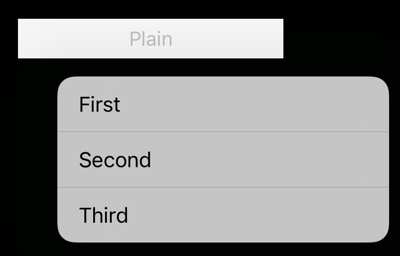
Handler gets the button as sender, and the selected action.
By default, the menu is displayed by a single tap, but you can set it to be activated with a long press, which enables you to use the regular button action for something else:
set_menu(button, [
    ('First', handler),
    ('Second', handler),
    ('Third', handler),
], long_press=True)

button.action = something_else
For slightly more complex menus, you can define Actions:
from ui3.menu import set_menu, Action
from ui3.sfsymbol import SymbolImage

placeholder = print

set_menu(button, [
    Action(
        'Verbose menu item gets the space it needs', placeholder,
    ),
    Action(
        'Regular Pythonista icon', placeholder,
        image=ui.Image('iob:close_32'),
    ),

    Action(
        'SFSymbol', placeholder,
        image=SymbolImage('photo.on.rectangle'),
    ),
    Action(
        'Destructive', placeholder,
        image=SymbolImage('tornado'),
        attributes=Action.DESTRUCTIVE,
    ),
    Action(
        'Disabled', placeholder,
        attributes=Action.DISABLED,
    ),
])
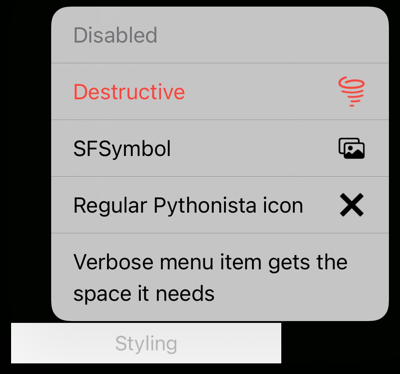
Actions have the following attributes:
- title
- handler - function or method
- image - if you set the destructive attribute, image is tinted system red automatically
- attributes - summed combination of
Action.HIDDEN,DESTRUCTIVEandDISABLED- by default none of these are active - state - either
Action.REGULAR(default) orSELECTED - discoverability_title
... and some convenience boolean properties (read/write):
selectedhiddendisableddestructive
(Note that there is nothing inherently destructive by an action marked as destructive, it's just visuals.)
Changing the Action's attributes automatically updates the menu that it is included in. See this example that shows both the selection visual and updating a hidden action:
expert_action = Action(
    "Special expert action",
    print,
    attributes=Action.HIDDEN,
)

def toggle_handler(sender, action):
    action.selected = not action.selected
    expert_action.hidden = not action.selected

set_menu(button2, [
    ('Expert mode', toggle_handler),
    expert_action,
])

Still something to be thought about is a way to keep the menu visible as actions are selected/hidden/shown/added/removed.