mikael
Nov 19, 2019 - 04:28
Anyone with the latest beta, can you use the new symbol set that comes with iOS 13, e.g.:
i = ui.Image('lessthan.circle')
Anyone with the latest beta, can you use the new symbol set that comes with iOS 13, e.g.:
i = ui.Image('lessthan.circle')
@mikael
i = ui.Image('lessthan.circle')
=> OSError: Could not load image
i = ui.Image.named('lessthan.circle')
i.show()
=> AttributeError: 'NoneType' object has no attribute 'show'
@mikael this works
o = ObjCClass('UIImage').systemImageNamed_('lessthan.circle')
with ui.ImageContext(32,32) as ctx:
    o.drawAtPoint_(CGPoint(0,0))
    ui_image = ctx.get_image()
ui_image.show()

@cvp, sweet! This also works in the app store version.
1500 symbols available, built in and matching the rest of the OS in look and feel.
@mikael 👍
@cvp, I am just a little bit frustrated that we cannot go the easy route with ui.Image.from_data because we cannot(?) call the UIImagePNGRepresentation ObjC function.
@mikael is that what you want?
import ui
from objc_util import *
o = ObjCClass('UIImage').systemImageNamed_('lessthan.circle')
UIImagePNGRepresentation = c.UIImagePNGRepresentation
UIImagePNGRepresentation.restype = c_void_p
UIImagePNGRepresentation.argtypes = [c_void_p]
UIImage_data = nsdata_to_bytes(ObjCInstance(UIImagePNGRepresentation(o)))
ui_image = ui.Image.from_data(UIImage_data)
ui_image.show()
@mikael said:
UIImagePNGRepresentation
why not?
Actually, try this -- works for regular ui.Image's:
i=ui.Image.named('iow:alert_32')
o = ObjCClass('UIImage').systemImageNamed_('lessthan.circle')
i.objc_instance.setImageAsset_(o.imageAsset())
now i should be pointing to the same image asset as o, just in a convienent ui.Image wrapper.
Is there a way to programmatically obtain the 1,500 strings that correspond to the 1,500 images?
@ccc, see a list as a simple text file here. It still has the ”Usage restricted...” lines included. I am considering creating a simple browser for Pythonista.
@JonB, looks to me like imageAsset is readonly.
@JonB
i.objc_instance.setImageAsset_(o.imageAsset())
gives
TypeError: expected 5 arguments, got 1
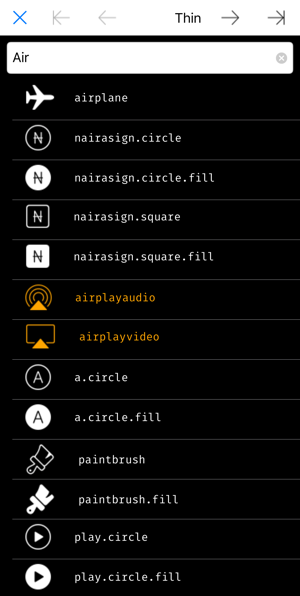
Ok, a quick and dirty symbol browser here. Expects to have the list of symbol names linked above in the same directory.
Tap on row to copy symbol name to clipboard. Tap on ”Thin” to cycle through different weights. Symbols restricted by Apple for a specific app are shown in orange.
@mikael said:
quick and dirty
are reserved (by me) words, you'll have to pay royalties 😂
And, your code is never dirty... while mine, yes
@cvp strange, works on my ios9 ipad. ill have to play around with my ios13.
@JonB, must have changed since iOS 9? As said, imageAsset is now marked as readonly in the docs, and there is this statement in the first paragraph of UIImage:
”Image objects are immutable, so you always create them from existing image data, such as an image file on disk or programmatically created image data.”
As a half-accidental result, you can use the file linked above as a package:
import sfsymbol

img = sfsymbol.SymbolImage('arrow.right.to.line')
There are three optional parameters:
* point_size - Integer font size
* weight - Font weight, one of sfsymbol.ULTRALIGHT, THIN, LIGHT, REGULAR, MEDIUM, SEMIBOLD, BOLD, HEAVY, BLACK
* scale - Size relative to font size, one of SMALL, MEDIUM, LARGE
@mikael if you call your code dirty again, I promise to stop writing programs 😂
@mikael thanks for this, excellent. (If only it had a fuzzy search function... Just if you feel bored...)
@pulbrich, others, any suggestions for a fuzzy search? fuzzywuzzy is good, but I would like to avoid requiring an extra install. difflib.get_close_matches results are highly unintuitive.
Is there something easy to use provided by iOS?
@mikael you could try FuzzyFinder in 10 lines of Python
Cheers,
I would go with @TPO ‘s idea, perfectly enough for the purpose.
@pulbrich, @TPO, thanks. Search now included, see the updated picture above.
Usability is not 100% - for some reason textfield.end_editing() does not hide the keyboard, at least on my phone.
@mikael Many, many thanks! Perfect now!
@mikael said:
for some reason textfield.end_editing() does not hide the keyboard
Same on my iPad mini 4 (iOS 13 + Pythonista beta)
There is a kind of flicking, I think that the keyboard is dismissed and then comes back.
FWIW:
from ui import *
from objc_util import *
uiimage=ObjCClass('UIImage')
v=Image.named('test:Lenna')
u=uiimage.systemImageNamed_('lessthan.circle')
v.objc_instance._setImageAsset_(u.imageAsset())
Leading underscore did the trick, iPadOS 13.1.3.
Maybe not the most future proof, but does the job...
@JonB As usual, you're the 🤴
@JonB, thanks. Intuitively this seems like it should be faster and more efficient than going via the PNG conversion.
But when I went to test the performance I ran into a couple of issues with the asset approach:
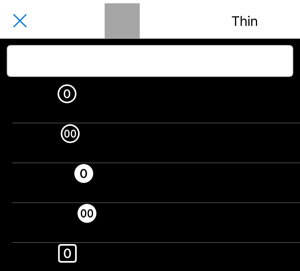
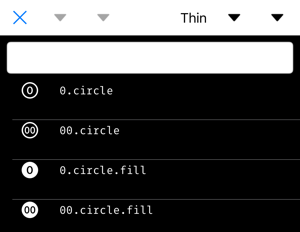
See below couple of example images. First one uses a too-large initializing picture (Lenna), the second too small one (triangle arrow icon), which you can see presented in the title area.
@mikael your module now crashes with
Traceback (most recent call last):
  File "/private/var/mobile/Containers/Shared/AppGroup/668A7D98-7216-47ED-917D-AA0B6173167E/Pythonista3/Documents/MesTests/sfsymbol.py", line 233, in <module>
    data_source = symbol_table.data_source = SymbolSource(root, symbol_table)
  File "/private/var/mobile/Containers/Shared/AppGroup/668A7D98-7216-47ED-917D-AA0B6173167E/Pythonista3/Documents/MesTests/sfsymbol.py", line 76, in __init__
    image=SymbolImage('arrow.left', 8, weight=THIN),
  File "/private/var/mobile/Containers/Shared/AppGroup/668A7D98-7216-47ED-917D-AA0B6173167E/Pythonista3/Documents/MesTests/sfsymbol.py", line 27, in SymbolImage
    conf = UIImageSymbolConfiguration.configurationWithConfiguration_and_(
  File "/var/containers/Bundle/Application/34BAEE1A-BC33-4D6F-A0C1-B733E4991F31/Pythonista3.app/Frameworks/Py3Kit.framework/pylib/site-packages/objc_util.py", line 445, in __getattr__
    cached_method = ObjCClassMethod(self, attr)
  File "/var/containers/Bundle/Application/34BAEE1A-BC33-4D6F-A0C1-B733E4991F31/Pythonista3.app/Frameworks/Py3Kit.framework/pylib/site-packages/objc_util.py", line 752, in __init__
    raise AttributeError('No class method found for selector "%s"' % (self.sel_name))
AttributeError: No class method found for selector "configurationWithConfiguration:and:"
@cvp, yes, just noticed. iOS 14 must’ve changed it. Will take a look.
@mikael 900 added symbols in iOS 14 see here
@cvp, here’s the relevant code if you want to do a manual quick fix. Will push an update to PyPI soon.
    ...
    if point_size is not None:
        conf = conf.configurationByApplyingConfiguration_(
                UIImageSymbolConfiguration.configurationWithPointSize_(point_size))
    if weight is not None:
        conf = conf.configurationByApplyingConfiguration_(
            UIImageSymbolConfiguration.configurationWithWeight_(weight))
    if scale is not None:
        conf = conf.configurationByApplyingConfiguration_(
            UIImageSymbolConfiguration.configurationWithScale_(scale))
    objc_image = objc_image.imageByApplyingSymbolConfiguration_(conf)
    ...
@cvp, for the new symbols, I found a downloadable list of changes, but no list of new icons or an updated master list.
@mikael said:
if you want to do a manual quick fix.
Seems ok
@mikael dis you see? Even colored ones
If someone interested in a list of string, here we go
import plistlib
import io

vFilePath = '/System/Library/CoreServices/CoreGlyphs.bundle/symbol_order.plist'

with open(vFilePath, 'rb') as vFile:
    vFileObject = io.BytesIO(vFile.read())
vJsonSFSymbols = plistlib.load(vFileObject)

for vIndex, vJsonSFSymbol in enumerate(vJsonSFSymbols):
    print(str(vIndex).zfill(4), vJsonSFSymbol)
@7upser, excellent! I ran a quick comparison, and the plist list has all the symbols that the ”manual” list had, plus 162 additional symbols all ending in one of: ar, he, hi, ja, ko, zh or rtl, which I take to be additional language-based versions.
With this, when I have a moment, I can probably change the symbol browser to show whatever you have available in your iOS version, rather than relying on a manually updated list. What seems to be missing, though, is the marker for the symbols that Apple says must not be used outside their Apple context (like ”airpods”).
I'm missing the Categories for SF Symbols.
I think there are only Categories in the Mac App.
I found two older version and a Screenshot for the new Gaming Cat.
I add some cats for newer Symbols, but didn't finished.
This is what i have (with Pythonista Symbols and Emojis)
Names of restricted Symbols are here:
/System/Library/CoreServices/CoreGlyphs.bundle/symbol_restrictions.strings
(also a plist file)