Ichicoro
Aug 22, 2019 - 12:13
Has anyone gotten popovers to work on iphone? I'd like to present a view as popover but I don't really understand the objc code behind it
Has anyone gotten popovers to work on iphone? I'd like to present a view as popover but I don't really understand the objc code behind it
@Ichicoro, maybe check @JonB’s code for Overlay?
@Ichicoro funnily enough I had to implement this recently. It requires some fiddling with objc view controller stuff, since you have to force the behavior to show as a popover instead of fullscreen view on the iPhone:
import objc_util

def getUIViewController(cls, view):
        import objc_util
        UIViewController = objc_util.ObjCClass('UIViewController')
        UIView = objc_util.ObjCClass('UIView')
        viewobj = view.objc_instance
        viewResponder = viewobj.nextResponder()
        try:
            while not viewResponder.isKindOfClass_(UIViewController):
                viewResponder = viewResponder.nextResponder()
        except AttributeError:
                return None
        return viewResponder

def adaptivePresentationStyleForPresentationController_(_self, _cmd, controller):
    return UIModalPresentationNone # == -1

def popoverPresentationControllerDidDismissPopover_(_self, _cmd, controller):
    import objc_util
    delegate = objc_util.ObjCInstance(_self)
    if delegate._completion is not None:
        delegate._completion()

PopoverPresentationDelegate = objc_util.create_objc_class(
                "PopoverPresentationDelegate",
                methods=[adaptivePresentationStyleForPresentationController_,
                        popoverPresentationControllerDidDismissPopover_],
                protocols=["UIPopoverPresentationControllerDelegate"])

def popover(sourceview, popview, completion=None):
    def _closer(vc):
        def _f():
            vc.dismissViewControllerAnimated_completion_(True,None)
        return _f

    parentvc = getUIViewController(sourceview)
    UIViewController = objc_util.ObjCClass("UIViewController")
    oldvc = getUIViewController(popview)
    if oldvc is not None: oldvc.view = None

    vc = UIViewController.new().autorelease()
    popview.flex = "WH"
    vc.view = popview.objc_instance
    vc.modalPresentationStyle = UIModalPresentationPopover # == 7
    vc.preferredContentSize = objc_util.CGSize(popview.width, popview.height)
    popovervc = vc.popoverPresentationController()
    if popovervc is not None:
        delegate = PopoverPresentationDelegate.new().autorelease()
        delegate._completion = completion
        delegate._popview = popview
        popovervc.delegate = delegate
        popovervc.sourceView = sourceview.objc_instance
        popovervc.sourceRect = objc_util.CGRect(objc_util.CGPoint(0,0),objc_util.CGSize(sourceview.width, sourceview.height))
    parentvc.presentViewController_animated_completion_(vc,True,None)
    return _closer(vc)
@shinyformica Sorry, maybe a stupid question, but how to use it :)
First, here's a newer version with some improvements which make it work better on iOS 13, and adds a callback which is called when the popover is presented:
def adaptivePresentationStyleForPresentationController_(_self, _cmd,
                                                                controller):
    #### force the popover presentation style to stay as-is
    return -1 # UIModalPresentationNone

def popoverDelegateCompletion(delegate):
    if delegate._popview is not None and delegate._bgcolor is not None:
        delegate._popview.background_color = delegate._bgcolor
    if delegate._completion is not None:
        delegate._completion()
    delegate._popview = None
    delegate._presented_block = None

def popoverPresentationControllerDidDismissPopover_(_self, _cmd, controller):
    import objc_util
    delegate = objc_util.ObjCInstance(_self)
    popoverDelegateCompletion(delegate)

PopoverPresentationDelegate = objc_util.create_objc_class(
                "PopoverPresentationDelegate",
                methods=[adaptivePresentationStyleForPresentationController_,
                            popoverPresentationControllerDidDismissPopover_],
                protocols=["UIPopoverPresentationControllerDelegate"])

def popover(sourceview, popview, presented=None, dismissed=None):
    """Create and display a popover modal view containing the given
    content view, with a little arrow pointing at the given source view.
    'presented' is called when the popover is first presented.
    'dismissed' will be called when the popover is dismissed."""

    def _closer(vc, delegate):
        #### return a function object which will dismiss the popover
        #### and restore the popview bg color, as well as call
        #### any completion function
        def _f():
            vc.dismissViewControllerAnimated_completion_(True,None)
            popoverDelegateCompletion(delegate)
        return _f

    #### find the view controller which is presenting the source view
    #### this is what the popover arrow will point at
    sourcevc = ViewHierarchy.getUIViewController(sourceview)
    #### create a new modal view controller and set its presentation
    #### style to the popover style, and size it to the content
    UIViewController = objc_util.ObjCClass("UIViewController")
    vc = UIViewController.new().autorelease()
    vc.modalPresentationStyle = 7 # UIModalPresentationPopover
    vc.preferredContentSize = objc_util.CGSize(popview.width, popview.height)

    #### As of iOS 13+ popover presentation bounds include the little arrow
    #### as part of the content area.
    #### Since our popup content is designed to be displayed only in the
    #### rectangular portion of the popover view, we constrain it to
    #### the "safe area", which excludes the arrow.
    safeView = objc_util.UIView.new().autorelease()
    safeView.addSubview_(popview.objc_instance)
    safeView.backgroundColor = objc_util.UIColor.clearColor()
    vc.view = safeView
    popview.objc_instance.translatesAutoresizingMaskIntoConstraints = False
    guide = safeView.safeAreaLayoutGuide()
    anchor = popview.objc_instance.leadingAnchor()
    anchor.constraintEqualToAnchor_(guide.leadingAnchor()).active = True
    anchor = popview.objc_instance.trailingAnchor()
    anchor.constraintEqualToAnchor_(guide.trailingAnchor()).active = True
    anchor = popview.objc_instance.topAnchor()
    anchor.constraintEqualToAnchor_(guide.topAnchor()).active = True
    anchor = popview.objc_instance.bottomAnchor()
    anchor.constraintEqualToAnchor_(guide.bottomAnchor()).active = True

    #### retrieve the popover presentation controller for the new modal
    #### view controller, bail if that fails for some reason
    popover = vc.popoverPresentationController()
    if popover is None: return None

    #### create and assign the popover presentation delegate
    delegate = PopoverPresentationDelegate.new().autorelease()
    delegate._completion = dismissed
    delegate._popview = popview
    delegate._bgcolor = None
    popover.delegate = delegate

    #### if the popview has a translucent background, make the
    #### presenting view translucent instead, and the popview transparent,
    #### save the original color to restore on dismissal.
    color = popview.background_color
    if color[3] < 1.0:
        popview.background_color = "clear"
        delegate._bgcolor = color
    popover.backgroundColor = objc_util.UIColor.colorWithRed_green_blue_alpha_(*color)
    popover.sourceView = sourceview.objc_instance
    popover.sourceRect = objc_util.CGRect(objc_util.CGPoint(0,0),objc_util.CGSize(
                                            sourceview.width, sourceview.height))
    #### if a presentation function is provided, it is converted to an
    #### objective-c block to be called when the popover is displayed
    objc_f = None
    if presented is not None:
        objc_f = objc_util.ObjCBlock(presented, None, [objc_util.c_void_p])
        delegate._presented_block = objc_f
    #### present the view controller containing the popover content
    #### via the popover presentation controller, using the
    #### popover delegate we created, and return the close
    #### function to allow caller to close the popover from code
    sourcevc.presentViewController_animated_completion_(vc, True, objc_f)
    return _closer(vc, delegate)
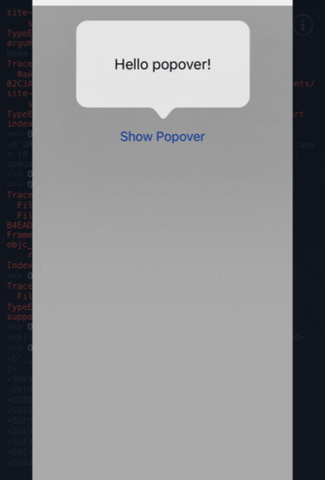
it's simple enough to use. When you wish to display a view as a popover, just call like so:
def popover(sender):
    popview = ui.View()
    popview.width = 200
    popview.height = 100
    popview.add_subview(ui.Label(text="Hello popover!", flex="WH")
    popover(sender, popview)

v = ui.View()
v.width = 300
v.height = 300
b = ui.Button()
b.title = "Show Popover"
b.action = showPopover
b.frame = (0,0,100,40)
b.center = v.center
v.add_subview(b)
v.present("sheet")
@shinyformica, some typos in the example, should probably be:
import ui

def showPopover(sender):
    popview = ui.View()
    popview.width = 200
    popview.height = 100
    popview.add_subview(ui.Label(text="Hello popover!", flex="WH"))
    popover(sender, popview)

v = ui.View()
v.width = 300
v.height = 300
b = ui.Button()
b.title = "Show Popover"
b.action = showPopover
b.frame = (0,0,100,40)
b.center = v.center
v.add_subview(b)
v.present("fullscreen")
But what is ViewHierarchy?
I haven't managed to make something work, ViewHierarchy is like I understand a pointer in <popover in ios 13, and how to make it all on 12.
@BapeHiks said:
I haven't managed to make something work, ViewHierarchy is like I understand a pointer in <popover in ios 13, and how to make it all on 12.
Change:
sourcevc = sourceview.objc_instance.ViewHierarchy.getUIViewController(sourceview)
to:
sourcevc = sourceview.objc_instance._findNearestViewController()
@BapeHiks
import ui
import objc_util

def adaptivePresentationStyleForPresentationController_(_self, _cmd,
                                                                controller):
    #### force the popover presentation style to stay as-is
    return -1 # UIModalPresentationNone

def popoverDelegateCompletion(delegate):
    if delegate._popview is not None and delegate._bgcolor is not None:
        delegate._popview.background_color = delegate._bgcolor
    if delegate._completion is not None:
        delegate._completion()
    delegate._popview = None
    delegate._presented_block = None

def popoverPresentationControllerDidDismissPopover_(_self, _cmd, controller):
    import objc_util
    delegate = objc_util.ObjCInstance(_self)
    popoverDelegateCompletion(delegate)

PopoverPresentationDelegate = objc_util.create_objc_class(
                "PopoverPresentationDelegate",
                methods=[adaptivePresentationStyleForPresentationController_,
                            popoverPresentationControllerDidDismissPopover_],
                protocols=["UIPopoverPresentationControllerDelegate"])

def popover(sourceview, popview, presented=None, dismissed=None):
    """Create and display a popover modal view containing the given
    content view, with a little arrow pointing at the given source view.
    'presented' is called when the popover is first presented.
    'dismissed' will be called when the popover is dismissed."""

    def _closer(vc, delegate):
        #### return a function object which will dismiss the popover
        #### and restore the popview bg color, as well as call
        #### any completion function
        def _f():
            vc.dismissViewControllerAnimated_completion_(True,None)
            popoverDelegateCompletion(delegate)
        return _f

    #### find the view controller which is presenting the source view
    #### this is what the popover arrow will point at
    sourcevc = sourceview.objc_instance._findNearestViewController()
    #### create a new modal view controller and set its presentation
    #### style to the popover style, and size it to the content
    UIViewController = objc_util.ObjCClass("UIViewController")
    vc = UIViewController.new().autorelease()
    vc.modalPresentationStyle = 7 # UIModalPresentationPopover
    vc.preferredContentSize = objc_util.CGSize(popview.width, popview.height)

    #### As of iOS 13+ popover presentation bounds include the little arrow
    #### as part of the content area.
    #### Since our popup content is designed to be displayed only in the
    #### rectangular portion of the popover view, we constrain it to
    #### the "safe area", which excludes the arrow.
    safeView = objc_util.UIView.new().autorelease()
    safeView.addSubview_(popview.objc_instance)
    safeView.backgroundColor = objc_util.UIColor.clearColor()
    vc.view = safeView
    popview.objc_instance.translatesAutoresizingMaskIntoConstraints = False
    guide = safeView.safeAreaLayoutGuide()
    anchor = popview.objc_instance.leadingAnchor()
    anchor.constraintEqualToAnchor_(guide.leadingAnchor()).active = True
    anchor = popview.objc_instance.trailingAnchor()
    anchor.constraintEqualToAnchor_(guide.trailingAnchor()).active = True
    anchor = popview.objc_instance.topAnchor()
    anchor.constraintEqualToAnchor_(guide.topAnchor()).active = True
    anchor = popview.objc_instance.bottomAnchor()
    anchor.constraintEqualToAnchor_(guide.bottomAnchor()).active = True

    #### retrieve the popover presentation controller for the new modal
    #### view controller, bail if that fails for some reason
    popover = vc.popoverPresentationController()
    if popover is None: return None

    #### create and assign the popover presentation delegate
    delegate = PopoverPresentationDelegate.new().autorelease()
    delegate._completion = dismissed
    delegate._popview = popview
    delegate._bgcolor = None
    popover.delegate = delegate

    #### if the popview has a translucent background, make the
    #### presenting view translucent instead, and the popview transparent,
    #### save the original color to restore on dismissal.
    color = popview.background_color
    if color[3] < 1.0:
        popview.background_color = "clear"
        delegate._bgcolor = color
    popover.backgroundColor = objc_util.UIColor.colorWithRed_green_blue_alpha_(*color)
    popover.sourceView = sourceview.objc_instance
    popover.sourceRect = objc_util.CGRect(objc_util.CGPoint(0,0),objc_util.CGSize(
                                            sourceview.width, sourceview.height))
    #### if a presentation function is provided, it is converted to an
    #### objective-c block to be called when the popover is displayed
    objc_f = None
    if presented is not None:
        objc_f = objc_util.ObjCBlock(presented, None, [objc_util.c_void_p])
        delegate._presented_block = objc_f
    #### present the view controller containing the popover content
    #### via the popover presentation controller, using the
    #### popover delegate we created, and return the close
    #### function to allow caller to close the popover from code
    sourcevc.presentViewController_animated_completion_(vc, True, objc_f)
    return _closer(vc, delegate)

def showPopover(sender):
    popview = ui.View()
    popview.width = 200
    popview.height = 100
    popview.add_subview(ui.Label(text="Hello popover!", flex="WH"))
    popover(sender, popview)

v = ui.View()
v.width = 300
v.height = 300
b = ui.Button()
b.title = "Show Popover"
b.action = showPopover
b.frame = (0,0,100,40)
b.center = v.center
v.add_subview(b)
v.present("sheet")
@BapeHiks, suggest these tweaks to the popover presentation so that it looks nicer:
    def showPopover(sender):
        popview = ui.Label(
            text="Hello popover!",
            alignment=ui.ALIGN_CENTER,
        )
        popview.size_to_fit()
        popview.frame = popview.frame.inset(-8, -16)
        popover(sender, popview)
sourcevc = sourceview.objc_instance._findNearestViewController()

AttributeError: No method found for selector ":findNearestViewController"
if I understand correctly sourcevc should be a view.
@BapeHiks said:
```
sourcevc = sourceview.objc_instance._findNearestViewController()AttributeError: No method found for selector ":findNearestViewController"
```
if I understand correctly sourcevc should be a view.
vc in sourcevc stands for view controller i also do not get this error.. what are you passing for your sourceview
@stephen
I used the examples above, generally in the
taking the very first post with code managed to
changed
def adaptivePresentationStyleForPresentationController_(_self, _cmd, controller):
    return -1 #UIModalPresentationNone # == -1

vc.modalPresentationStyle = 7 #UIModalPresentationPopover # == 7
@BapeHiks said:
@stephen
I used the examples above, generally in thetaking the very first post with code managed to
changed
```
def adaptivePresentationStyleForPresentationController_(_self, _cmd, controller):
return -1 #UIModalPresentationNone # == -1vc.modalPresentationStyle = 7 #UIModalPresentationPopover # == 7
```
Outstanding! im glad you got it working!
i didnt realize this was for iPhone not iPad until few hours after my post lol
Sorry for the typos and things...I didn't really test what I posted, just copy pasted stuff from my own project and test code, and modified it to remove extra utilities and things that I wrote which are in other modules.
Thanks to those who fixed those issues, glad it's working.
The ViewHierarchy thing is a utility class I have which holds a bunch of tricks and things for helping with navigating the views in my projects. The actual definition of getUIViewController is:
def getUIViewController(cls, view):
        import objc_util
        UIViewController = objc_util.ObjCClass('UIViewController')
        UIView = objc_util.ObjCClass('UIView')
        if isinstance(view,ui.View):
            viewobj = view.objc_instance
        elif isinstance(view,objc_util.ObjCInstance) and \
                view.isKindOfClass_(UIView):
            viewobj = view
        elif isinstance(view,objc_util.ObjCInstance) and \
                view.isKindOfClass_(UIViewController):
            viewobj = view
        viewResponder = viewobj.nextResponder()
        try:
            while not viewResponder.isKindOfClass_(UIViewController):
                viewResponder = viewResponder.nextResponder()
        except AttributeError:
                return None
        return viewResponder
which crawls the responder chain to find the view controller living above the one controlling the passed-in view, or the view controller if one was given. Anyway...looking at what @stephen posted...I think I should actually just be doing that instead.