Python gesture implementation on Github for those situations where you cannot or do not want to use the ObjC gestures.
Simple usage example:
import pygestures

class MyTouchableView(pygestures.GestureView):

  def on_swipe(self, data):
    if data.direction in (data.UP, data.DOWN):
      print('I was swiped vertically')
Run the file as-is to play around with the gestures. (Green circles track your touches, crosshairs show the centroid, red circle reflects pan, pinch and rotation.)
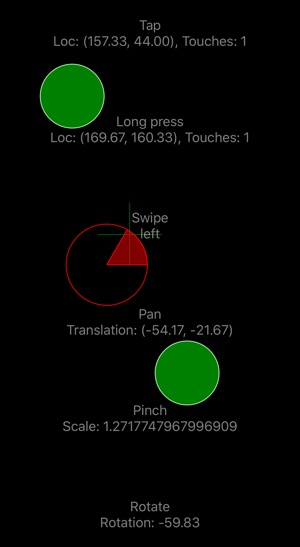
In your subclass, implement any or all the methods below to handle gestures. All methods get an information object with attributes including:
state- one of BEGAN, CHANGED, ENDEDlocation- location of the touch, or the centroid of all touches, as a scene.Pointno_of_touches- use this if you want to filter for e.g. only taps with 2 fingers
Methods:
on_tapon_long_presson_swipe- data includesdirection, one of UP, DOWN, LEFT, RIGHTon_swipe_up,on_swipe_down,on_swipe_left,on_swipe_righton_pan- data includestranslation, the distance from the start of the gesture, as a scene.Point. For most purposes this is better thanlocation, as it does not jump around if you add more fingers.on_pinch- data includesscaleon_rotate- data includesrotationin degrees, negative for counterclockwise rotation
There are also prev_translation, prev_scale and prev_rotation, if you need them.
If it is more convenient to you, you can inherit GestureMixin together with ui.View or some other custom view class. In that case, if you want to use e.g. rotate, you need to make sure you have set multitouch_enabled = True.