Forum Archive

Gestures updated

mikael

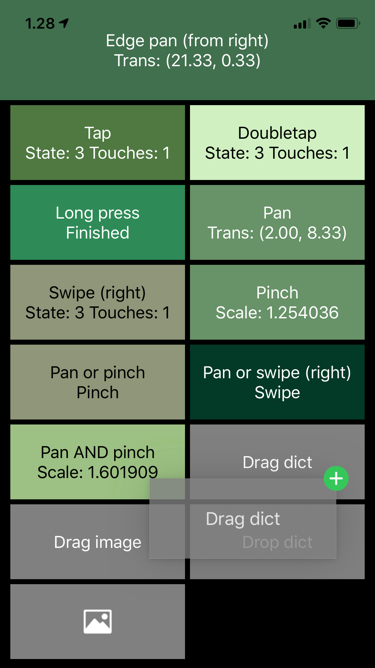
I intended to just update the documentation a bit, but ended redoing the whole demo, because it was fun.

Also added a force (3D) touch gesture, should work for Apple stylus as well - would appreciate it if someone with Apple Pencil could test it.

Demo image

Get it from GitHub.

dcl

Would this work with the Scene module?

My understanding of your code, from reading through the python file, leads me to believe that a UI object has to be included. I don’t know a whole lot about the ObjC classes for gesture handling, so beyond what is written in your python file I don’t know how the code operates.

I’m trying to get some form of gesture control in a Scene module that I am writing. I took inspiration from your original Gestures code and some touch tracking code I found online to brew my own bit of gesture handling, but it isn’t currently functional. I am trying to gauge whether to trash it and try to adapt / use what you’ve written directly with the Scene module or whether to seek help to get what I have working.

JonB

This might work an a scene view, but not a scene.

mikael

@dcl, what @JonB said. Gestures can be expected to work on the level of the whole scene.view, but not on the level of individual Nodes, which to my understanding are made of GL code created by @omz, i.e. they have no connection to Apple UIKit gestures.

As Nodes expose touches, it is reasonably easy to roll your own gestures where needed. And since all the relevant code in Gestures is Apple's and hidden behind the covers, I would not think that Gestures would be a very useful as a template for your custom gestures. Rather, I would look at the numerous scene-based games for samples.

Supplementing view-level gestures (handled by Gestures code) with your own Node-level gestures code is an idea, but expect some trouble managing both firing at the same time. At least that's what happens in UI code.