Forum Archive

Creating Home Screen Icons

omz

Version 1.2 introduces the pythonista:// URL scheme for opening and running scripts in your library. Using Safari web clips (home screen bookmarks), you can use this to create dedicated icons for your scripts on the home screen.

As of now, this is pretty much a proof of concept, there's no way to select different icons, and the UI is pretty sparse, but if you like experiments, open this page on a device that has Pythonista installed:

http://omz-software.com/pythonista/shortcut
Dalorbi39

'Scuse me @omz could i have a detailed explanation on how to do this? When i open the shortcut it gives me:

the url could not be shown
omz

Do you have the latest update installed (version 1.2, out today)? It only works with that.

Dalorbi39

Yeah but there's still a problem
Here are my steps

1. Open the link
2. Type the name of one of my scripts in this case a default one (Zen)
3. Then rename the homescreen icon name to Zen
4. open it

This is where my error message pops up.

omz

Hm, weird, as I said, it's pretty experimental, but it's been working for me. Will look into it.

Jldiaz10

Working for me too

Jayhickey34

Working no problem for me here with my scripts. Love this!

PKHG222

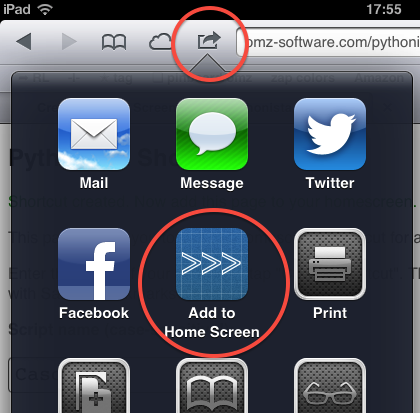
Sorry, not clear for me: where on Safari are "home screen bookmarks" to be found?

omz

It should look like this (make sure to tap the "Create Shortcut" link first):

Dalorbi39

im still on ios 5.1.1 so that may be a problem
hope y'all can help me out in this muddle

C0deH4cker

It should work on any iOS past like 3 or 4...

Dalorbi39

Does the shortcut need to be renamed to match the scripts name?

C0deH4cker

No it does not.

pantazi64

It does not work for me either. It is quite strange as it works perfectly fine if in run pythonista://MyScript? from safari

omz

@pantazi: Using iOS 5 or 6? Do you get any error message?

pantazi64

5, have an old ipad. I get the same error as above
the url could not be shown

pruppert222

These shortcuts seem to be broken on iOS 7.

Loveless212

yep it is broken on iOS 7

tacomaster26

: ( Any chance this can get fixed?

omz

I've looked into this, and it seems that it's no longer possible to make homescreen shortcuts that open non-web URLs (e.g. pythonista://...) on iOS 7, and I haven't found any workaround so far. I also tried creating a configuration profile with an embedded web clip, but that doesn't work either.

hvmhvm

I did it using a webclip in a profile (despite the fact that the documentation says the URL needs to start with http or https).

...
            <key>PayloadType</key>
            <string>com.apple.webClip.managed</string>
            <key>PayloadUUID</key>
            <string>70F36BDC-51AC-448E-B945-06837A970E2E</string>
            <key>PayloadVersion</key>
            <integer>1</integer>
            <key>URL</key>
            <string>pythonista://Domotica?action=run</string>
...

omz

It seems that this has been fixed in iOS 7.0.3, see also my blog post on the topic.

iAmMortos

My scripts are organized into folders. The shortcut making page just asks for the script name, which I supplied, but it says it couldn't find that script. I tried the path from
The root directory (like "Utils/myscript") but it said, "can't find script "Utils.py".
How do you create an icon for scripts organized in folders?

If I just type it into the web browser I can get it to work, though.

smithcamilla

There is a special software to create home Screen Icons, four skills support to implement this effect. In addition, if user get skills to manage home screen on iPad, so user would be delighted in using them.

freshwuzhere

@iAmMortos

Realise this is old but for anyone learning - I was struggling with this also - its very hard to see a long path on the iphone (my problem!) but mine worked by starting with a "./" so in your case the path in the safari page would be "./Utils/myscript.py" . The icon to make the bookmark on the home page is the share button.

Empyreal

@hvmhvm The link doesn't work anymore, but I've got the Apple Configurator tool on my Mac as well. Thanks to your hint, I used it to install a WebClip payload to invoke a Pythonista script and it works like a champ. I can also install various icons and whatnot.

For me, this is a better solution.

Has anyone updated a version of OMZ's web-page that will allow one to upload icons? That's the only thing really missing.

abakan4222

On last ios 15.1 its work again.
1)Set default browser firefox focus.
2)Than use original way to do home-shortcut from Pythonsta.
3) copy link from forefox and open it safari.

I noticed that sometimes its work or not. Usually form 1 or 3 retry it will be success. No reboot needed.
Link with video below.

link text