Forum Archive

video edition

jmv38

Is there some way to access each picture of a video, one by one?
And to write it back into a video asset?
ObjC utils maybe have such capabilities? (the photo app shows thumbnails of one video picture by picture).
Thanks!

[edit] btw, Pythonista is a.w.s.o.m.e !

JonB

My objc_hacks repo has a script get_frames which purports to do this. You get a .mov file into pythonista, then it loads each frame as an image into an imageview. you could save each image, etc. Processing it and making a new movie is harder, but possible, though i think requires some different techniques.

I think I used an okz script for capturing a movie to test this out, but i forget... or, i think someone posted code for a movie picker.

jmv38

ahhhh you are fantastic! I'll have a look!
what i really want is to analyse a video, and get data and parts of images out if it, i dont really need to create a movie back (although it would be nice).

[edit] your code is python2, so i am not sure how i make this work with python3 assets.
Ive got a .mov video in the photos, but i dont know how to get it into pythonista documents. For now, i've not gone furthrt than below:
~~~
assets = photos.get_assets(media_type='video')
print(len(assets))
asset = assets[-1]
asset.get_image().show()
print(asset.duration)
print(asset.local_id)
~~~
i should use Asset.get_image_data()
but i dont know how to use iobuffer to copy a file locally.

JonB

i updated to pick an asset, and not require a physical file. not very stable..

jmv38

@JonB thank you so much! 😍😍😍😍
your code works on my ipad.
I've tried to make time intervals equal to 1/30s instead of 1s
with this modification but i get an error (t.value should be int not float)

t=CMTime(0,1)  # timescale is the important bit
for i in range(0,int(duration)*30):
   t.value=i/30.0

any idea? Thanks!

[edit] peeking into apple dev doc, the object to access each frame seems to be AVAssetReader. But from apple doc, i cant write any code to use it ... 😒

JonB

t=CMTime(1,fps) in theory should let you set the frame rate you want. I tried it and was still getting 1 hz images. so this might be the limit of this method. therr are some other block based approaches...

jmv38

i've also tried that (and many variants) but i get the same results: looks like this command gives access to 1s thumbnails only. Although apple doc doesnt clearly say that, and even let think it should work for any time, within the defined after/before accuracy limits.
If i really want to acces more frames i can still use another app to slow down the frame rate, then convert to .mov, then access more frames.
Is the .mov mandatory? there are many other formats in the photos (mp4) and converting to mov is painful.

[edit] works fine with not .mov videos (dont know why...)
and slowing by down the video, i do access more frames.
[edit] using slo mo video free app that can do speed/10, i managed to achieve about 1. frame/s so my goal can be achieved. I'd rather do everything from pythonista, though.

jmv38

@JonB i have asked the guy who has made the video_2_photos app on the app-store for help: he has kindly confirmed that we are using the good function and that we should set time before and after to kCMTimeZero to get a frame accuracy.
Can you check what is the real value of kCMTimeZero? since we do not call it directly in your code, maybe the given value is not correct, and it is why we dont get the good accuracy?
[edit] or maybe the problem is in the type int64? (just guessing)

JonB

@jmv38 i have a mostly working version with AVAssetReader. Just debugging a memory leak. This seems like a good option if we can get it working

kCMTimeZero is
CMTime.in_dll(c,'kCMTimeZero')

or CMTime(0,1,1,0)

jmv38

yippyyyyyy!
that was it:
z=CMTime(0,1,1,0)
the flag value had to be 1, not 0!
with this correction ir works!
thanks a lot!

jmv38

@JonB i have put this in the code, it works:

kCMTimeZero = CMTime.in_dll(c,'kCMTimeZero')
z = kCMTimeZero

can you explain a little bit the in_dll function? Does it have to be CMTime.in_dll() and not just ctype.in_dll()?

Since now we have the ability of read frames, do you know how to write frames in a new video? That would close the loop...

JonB

This is a wierd ctypes thing that is less documented than it should be...

if there is a symbol called someSymbol exported in a dll, you can use
somectypestype.in_dll(dll, symbolname)
and ctypes will cast the address of the symbol to the type you tell it. In pythonista, objc_util.c is the only dll we need or can use. Often in objc you would use c_void_p.in_dll to access for example const NSString *, then use ObjCInstance to convert to an NSString. In this case I already had the structure defined.

Not all constants are actually exported as symbols, some are just #defines.

Btw, you can use mp4s,whatever, instead of the hardcoded url use

asset = photos.pick_asset(assets)
phasset=ObjCInstance(asset)
asseturl=ObjCClass('AVURLAsset').alloc().initWithURL_options_(phasset.ALAssetURL(),None)

If I may ask, what is your end goal? Depending on what sort of processing you are doing, there are different writing options

jmv38

@JonB thanks for the detailed explanation
My goal is not very well defined. I kind of dream about using pythonista to analyse videos to do superresolution, object tracking, dynamic 3d modeling, etc... Still a long way to go. I just think the ipad is an extraordinary tool if you can bend it to your will. Pythonista seems to enable that, with very low coding skills requirements (i mean: that match mine, and with the help of super-pro coders like you), i find that awsome and i am trying to see how far it can go.

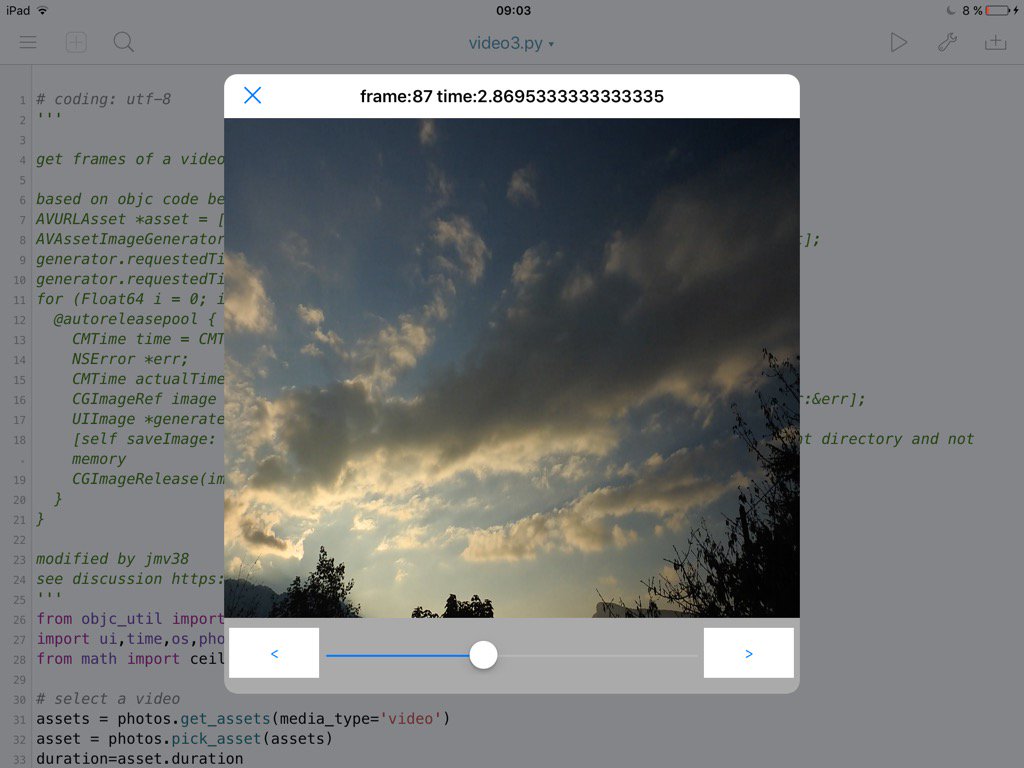
here is the last version of my code

# coding: utf-8
'''

get frames of a video, and show them in an imageview.

based on objc code below
AVURLAsset *asset = [[AVURLAsset alloc] initWithURL:url options:nil];
AVAssetImageGenerator *generator = [[AVAssetImageGenerator alloc] initWithAsset:asset];
generator.requestedTimeToleranceAfter =  kCMTimeZero;
generator.requestedTimeToleranceBefore =  kCMTimeZero;
for (Float64 i = 0; i < CMTimeGetSeconds(asset.duration) *  FPS ; i++){
  @autoreleasepool {
    CMTime time = CMTimeMake(i, FPS);
    NSError *err;
    CMTime actualTime;
    CGImageRef image = [generator copyCGImageAtTime:time actualTime:&actualTime error:&err];
    UIImage *generatedImage = [[UIImage alloc] initWithCGImage:image];
    [self saveImage: generatedImage atTime:actualTime]; // Saves the image on document directory and not memory
    CGImageRelease(image);
  }
}

modified by jmv38
see discussion https://forum.omz-software.com/topic/3621/video-edition/1
'''
from objc_util import *
import ui,time,os,photos,gc
from math import ceil

# select a video
assets = photos.get_assets(media_type='video')
asset = photos.pick_asset(assets)
duration=asset.duration

# init frame picker
phasset=ObjCInstance(asset)
asseturl=ObjCClass('AVURLAsset').alloc().initWithURL_options_(phasset.ALAssetURL(),None)
generator=ObjCClass('AVAssetImageGenerator').alloc().initWithAsset_(asseturl)

from ctypes import c_int32,c_uint32, c_int64,byref,POINTER,c_void_p,pointer,addressof, c_double

CMTimeValue=c_int64
CMTimeScale=c_int32
CMTimeFlags=c_uint32
CMTimeEpoch=c_int64
class CMTime(Structure):
   _fields_=[('value',CMTimeValue),
   ('timescale',CMTimeScale),
   ('flags',CMTimeFlags),
   ('epoch',CMTimeEpoch)]
   def __init__(self,value=0,timescale=1,flags=0,epoch=0):
      self.value=value
      self.timescale=timescale
      self.flags=flags
      self.epoch=epoch
c.CMTimeGetSeconds.argtypes=[CMTime]
c.CMTimeGetSeconds.restype=c_double

kCMTimeZero = CMTime.in_dll(c,'kCMTimeZero')
generator.setRequestedTimeToleranceAfter_(kCMTimeZero, restype=None, argtypes=[CMTime])
generator.setRequestedTimeToleranceBefore_(kCMTimeZero, restype=None, argtypes=[CMTime])

lastimage=None  # in case we need to be careful with references
fps = 30
tactual=CMTime(0,fps) #return value
currentFrame = 0
maxFrame = ceil(duration*fps)

def getFrame(i):
  t=CMTime(i,fps)
  cgimage_obj=generator.copyCGImageAtTime_actualTime_error_(t,byref(tactual),None,restype=c_void_p,argtypes=[CMTime,POINTER(CMTime),POINTER(c_void_p)])

  image_obj=ObjCClass('UIImage').imageWithCGImage_(cgimage_obj)
  ObjCInstance(iv).setImage_(image_obj)
  global lastimage
  lastimage=image_obj #make sure this doesnt get gc'd
  gc.collect() # to avoid pytonista random exit sometimes
  root.name=' frame:'+str(i)+' time:' +str(tactual.value/tactual.timescale)

# set up a view to display
root=ui.View(frame=(0,0,576,576))
iv=ui.ImageView(frame=(0,0,576,500))
root.add_subview(iv)

# a slider for coarse selection
sld = ui.Slider(frame=(100,500,376,76))
sld.continuous = False
root.add_subview(sld)
def sldAction(self):
  global currentFrame
  currentFrame = int(duration*self.value*fps)
  getFrame(currentFrame)
sld.action = sldAction

# buttons for frame by frame
prev = ui.Button(frame=(5,510,90,50))
prev.background_color = 'white'
prev.title = '<'
def prevAction(sender):
  global currentFrame
  currentFrame -= 1
  if currentFrame < 0: currentFrame = 0
  sld.value = currentFrame / fps / duration
  getFrame(currentFrame)
prev.action = prevAction
root.add_subview(prev)

nxt = ui.Button(frame=(480,510,90,50))
nxt.background_color = 'white'
nxt.title = '>'
def nxtAction(sender):
  global currentFrame
  currentFrame += 1
  if currentFrame > maxFrame: currentFrame = maxFrame
  sld.value = currentFrame / fps / duration
  getFrame(currentFrame)
nxt.action = nxtAction
root.add_subview(nxt)

root.present('sheet')
getFrame(currentFrame)
jmv38

oh, sorry, i misread you question

Depending on what sort of processing you are doing, there are different writing options

i intend to do numpy processing with float or complex, and when the processing is done, fetch back to RGB 24bits (or whatever format required to get a video)

jmv38

the above code gives this screenshot:

link text

jmv38

Hello @JonB
If I may ask, this message is just to know if you intend to look at the video writing problem? (I dont mean to harass you on that subject, you've already been a terrific help, thank you so much, this is just to know f you are working on it or not, to adjust my own coding plans with what you plan to share). Thanks!

JonB

@jmv38 I think what you probably are going to want is an AVVideoComposition, which lets you use standard or custom CIFilters to process a movie.

I am playing around with getting AVAssetReader workng, though I might not get a lot of time to work on this for a few weeks

jmv38

Thanks for your answer @JonB
I had a look at apple's doc on videocomposition. It is way over my head, so I'll postpone this part of my project to an indefinite date. And for now I'll focus on the many other parts that still need to be written, and are more within my reach...
Thanks!

JonB

btw, in the meantime, you should be able to access the imageview.image to get a ui.image, which you can the convert to jpg or png to write to a sequence of files, or PIL image for processing, etc.

jmv38

Correct. This is what i really needed in the first place. The video writing capability is just the 'cherry on the cake'.

jmv38

i found this link http://stackoverflow.com/questions/5640657/avfoundation-assetwriter-generate-movie-with-images-and-audio
The very first bloc of code in this topic is sufficient i think (i dont want to alter audio).
Is it possible to embed the whole code and pass it just the video and the image? Or do I have to call each line with objc utils?

SandraGarrett

can you explain a little bit the in_dll function?

cvp

@SandraGarrett more info on the .in_dll() method here

SandraGarrett

Thank you,
I am using powerdirector mod apk free download at TechBigs to edit my favorite videos.

ashishkumarji

I think I used an okz script for capturing a movie to test this out, but i forget... or, i think someone posted code for a movie picker.

Pythonised

I'd like to be able to get a video from the photos module or a local .mov file and show a given frame in the console.

There seems to be 2 ways to do this but neither is working for me yet.

I tried running this:

https://github.com/jsbain/objc_hacks/blob/master/getframes.py

But the resulting view is just a transparent overlay.

It seems to me that this returns a 'NoneType' object.

cgimage_obj=generator.copyCGImageAtTime_actualTime_error_(t,byref(tactual),None,restype=c_void_p,argtypes=[CMTime,POINTER(CMTime),POINTER(c_void_p)])

type(cgimage_obj)

It also looks like the photos module has a .seek function I am unable to get that to show me anything other than frame 1 using get_image().

Are there any working examples of this?

Thanks so much for your help.

JonB

Did you try the modified version of the code posted by @jmv38 at the top of this thread?

The next thing to do would be to step through each line and see if you are getting objects back. For instance, is generator valid, etc. I'll have to check, but some of these methods may be depreciated now.

Pythonised

@JonB

Hi. Thanks for the reply.

Yea I did. It has a similar result with a transparent view and not able to see any images. I’ve started going through your code line by line but I’ve only just starting to use objc_util and there are other things you are doing that are new to me.

My concern is that it isn’t possible anymore and I’m going down the wrong path.

cvp

@Pythonised In IOS 16/iPadOS 16, you will have Image at to replace deprecated copyCGImageAtTime_actualTime_error_